
Keep your inventories tidy with automatic sorting for inventory, backpack, and chests. Choose sorting by type, name, or rarity with persistent per-player settings.
AutoSort automatically keeps your inventories organized without any manual effort. Once configured, your inventory, backpack, and chests will stay sorted exactly how you want them.
Features
Use the /autosort command to open the settings menu where you can:
- Enable or disable inventory sorting
- Enable or disable backpack sorting
- Enable or disable chest sorting
- Choose your preferred sorting mode: by type, name, or rarity
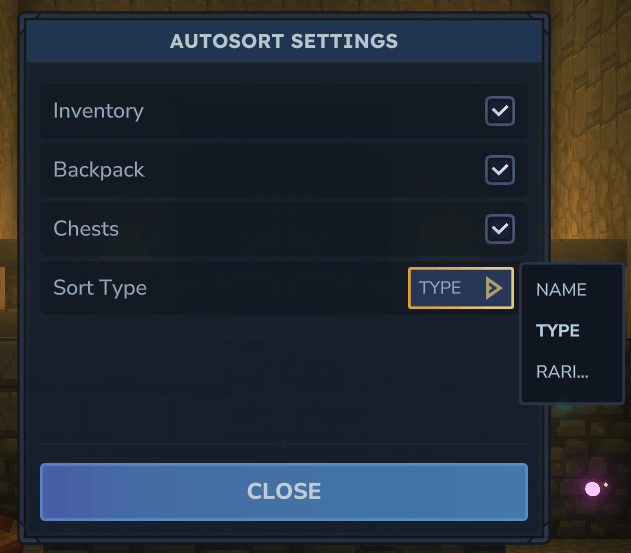
Settings are persistent per player and per server. No permissions are required to use this mod.
Server Owner Configuration
Server owners can customize default sorting settings for new players using two methods:
Option A - Automatic
Start the server once and shut it down gracefully. This generates:
<server root>/mods/Slymp_AutoSort/DefaultSortSettings.jsonEdit this file to adjust default values.
Option B - Manual
Create the file manually with this template:
{
  "SortInventory": true,
  "SortBackpack": true,
  "SortChests": true,
  "SortType": "Type"
}
Accepted SortType values: "Type" (default), "Rarity", or "Name"
These defaults only apply to players joining for the first time. Existing players keep their personal settings.
Known Limitations
- Moving a stack from or to the currently selected hotbar slot will not trigger a sort
- Furnace and Tannery Rack sorting is intentionally disabled to prevent item duplication bugs