![Wayfinder [Minimap]](/mods/wayfinder/thumb.png)
A server-side minimap plugin for Hytale that displays a real-time HUD overlay with map imagery, compass direction, coordinates, and hostile NPC tracking.
Never get lost in Hytale again with Wayfinder, a server-side minimap plugin that provides real-time navigation tools directly in your HUD. See your surroundings, track your position, and spot hostile mobs before they spot you.
What Does This Mod Do?
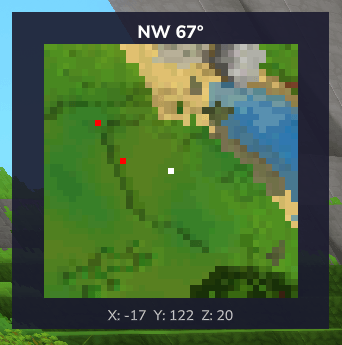
Wayfinder adds a 40x40 pixel minimap overlay that displays actual world map data in real-time. The map updates as you move, showing terrain around your position along with a compass heading and your exact X, Y, Z coordinates.
Beyond basic navigation, Wayfinder includes hostile NPC tracking that displays nearby enemies as colored blips on your minimap. This feature is fully configurable with wildcard patterns for NPC types or attitude-based detection.
Key Features
Real-Time Minimap
A 40x40 pixel grid displays the world around you, updating dynamically as you explore. The map is optimized to only send pixel updates when your position changes, reducing network traffic.
Compass & Coordinates
Always know which direction you’re facing with the compass display showing cardinal directions (N, NE, E, etc.) along with your degree heading. Live X, Y, Z coordinates keep you oriented at all times.
Hostile Mob Tracking
Red blips appear on your minimap when hostile mobs are within range. Customize detection using NPC type patterns with wildcards or use the attitude-based system. Both server-wide and per-player toggles are available.
Configurable Zoom Levels
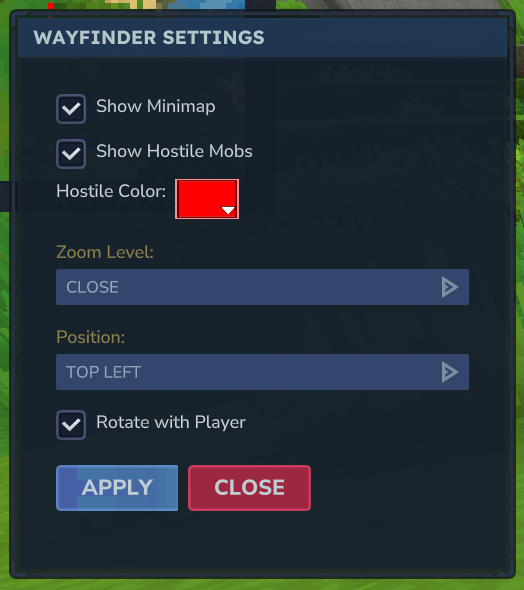
Switch between Close, Medium, and Far zoom presets to see more or less detail. Higher zoom levels show more area but less detail.
Per-Player Settings
Your preferences for visibility, zoom, position, blips, and rotation persist across sessions. Choose between north-up (fixed) or rotate-with-player orientation.
Commands
| Command | Alias | Description |
|---|---|---|
/wayfinder open | /wf open | Show the minimap |
/wayfinder close | /wf close | Hide the minimap |
/wayfinder toggle | /wf toggle | Toggle minimap visibility |
/wayfinder settings | /wf settings | Open the settings menu |
How to Use
- Install MultipleHUD and Wayfinder on your server
- Join the server - the minimap appears automatically by default
- Use
/wf settingsto customize position, zoom, and preferences - Use
/wf toggleto show or hide the minimap as needed
Server Configuration
Located at mods/x3Dev_Wayfinder/config.json:
- ZoomLevels: Define custom zoom presets (blocks per pixel)
- UpdateIntervalMs: Adjust update frequency (100-1000ms recommended)
- AutoShowOnJoin: Enable/disable automatic minimap on join
- HostileMobTracking: Configure enemy detection range and patterns
Who Is This Mod For?
This mod is ideal for:
- Explorers who want to navigate efficiently
- Server owners wanting quality-of-life navigation
- Players who like awareness of nearby threats
- Anyone who gets lost easily in large worlds
You might not need this if:
- You prefer minimal HUD elements
- Your server has strict performance constraints with many players
Performance Considerations
Wayfinder is server-side, so all rendering happens on the server. For high-population servers:
| Players | Recommended UpdateIntervalMs |
|---|---|
| 1-3 | 100 |
| 4-5 | 200-300 |
| 6-10 | 500 |
| 11+ | 1000 |
Compatibility
- Hytale Version: Early Access and above
- Dependencies: MultipleHUD (required)
- Conflicts: None known
About the Author
Alexr03 created Wayfinder as a proof-of-concept demonstrating server-side minimap capabilities in Hytale. The mod provides a functional navigation system while acknowledging room for future improvements.
Frequently Asked Questions
Why does the minimap require MultipleHUD?
Hytale only allows one CustomUI HUD to be active by default. MultipleHUD enables multiple HUD mods to work together simultaneously.
Can I add waypoints or custom markers?
Currently, waypoints and custom markers are not implemented. This is noted as a potential future feature.
Does the map show all biomes accurately?
Map imagery is basic and may not represent all biomes or structures with perfect accuracy. This is a known limitation of the current version.